
티스토리 뷰
surveyForm.jsp
<%@ page contentType="text/html; charset=utf-8" %>
<!DOCTYPE html>
<html>

<head>
<title>설문조사</title>
</head>

<body>
	<h2>설문조사</h2>
	<form method="post">

	<p>
		1. 당신의 역할은? <br/>
		<label><input type="radio" name="responses[0]" value="서버">서버개발자</label>
		<label><input type="radio" name="responses[0]" value="프론트">프론트개발자</label>
		<label><input type="radio" name="responses[0]" value="풀스택">풀스택개발자</label>
	</p>

	<p>
		2. 가장 많이 사용하는 개발도구는? <br/>
		<label><input type="radio" name="responses[1]" value="Eclipse">Eclipse</label>
		<label><input type="radio" name="responses[1]" value="Intellij">Intellij</label>
		<label><input type="radio" name="responses[1]" value="Sublime">Sublime</label>
	</p>

	<p>
		3. 하고 싶은 말 <br/>
		<input type="text" name="responses[2]">
	</p>

	<p>
		<label>응답자 위치:<br>
		<input type="text" name="res.location">
		</label>
	</p>

	<p>
		<label>응답자 나이:<br>
		<input type="text" name="res.age">
		</label>
	</p>
	<input type="submit" value="전송">

	</form>
</body>
</html>
위 jsp 코드는 아래와 같은 뷰를 보여준다.
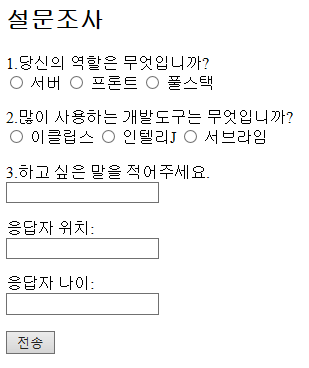
surveyForm.jsp 는 모든 input 태그를 일일히 하드 코딩했는데 Model 객체와 JSTL을 이용해 이를 바꿔볼 것이다.
컨트롤러에서 Model.addAttribute로 데이터 담기
우선 질문 내용(String)과 질문에 따른 보기들(List<String>)을 저장할 Question 클래스를 만든다.
Question.java
package survey;

import java.util.Collections;
import java.util.List;

public class Question
{
	private String title;
	private List<String> options;

	public Question(String title, List<String> options)
	{
		this.title = title;
		this.options = options;
	}

	public Question(String title)
	{
		this(title, Collections.<String>emptyList());
	}

	public String getTitle()
	{
		return title;
	}

	public List<String> getOptions()
	{
		return options;
	}

	// getter
	// true시 객관식
	public boolean isChoice()
	{
		return options != null && !options.isEmpty();
	}
}
이 Question 객체를 이용해 질문들과 보기를 순차적으로 출력할 것이다.
isChoice는 getter로서 true면 객관식, false면 주관식을 나타낸다.
주관식 질문일 경우 보기는 없으므로 생성자에서 그냥 empty List를 만들고 있다.
다음은 컨트롤러다.
SurveyController.java
package survey;

// ... 생략

@Controller
@RequestMapping("/survey") // 이 클래스는 "/survey" 경로 처리
public class SurveyController
{
	// GET 방식의 "/survey" 경로 요청 처리 (주소창 직접 입력은 GET 방식)
	@GetMapping
	public String form(Model model)
	{
		List<Question> questions = createQuestions();
		model.addAttribute("questions", questions);
		return "survey/surveyForm";
	}

	private List<Question> createQuestions()
	{
		Question q1 = new Question("당신의 역할은 무엇입니까?",
				Arrays.asList("서버", "프론트", "풀스택"));
		Question q2 = new Question("많이 사용하는 개발도구는 무엇입니까?",
				Arrays.asList("이클립스", "인텔리J", "서브라임"));
		Question q3 = new Question("하고 싶은 말을 적어주세요.");
		return Arrays.asList(q1, q2, q3);
	}


    // ... 생략
}
form 메서드는 GET 방식의 /survey 경로 요청을 처리하고, 뷰 이름 "survey/surveyForm"을 리턴한다.
createQuestions() 메서드를 보면 Question 객체들을 만들어 리스트에 담아 리턴한다.
form() 메서드에서 createQuestions() 메서드로 질문들이 담긴 리스트를 받고, 이 리스트 List<Question> questions를 model.addAttribute() 로 추가한다.
이제 이 Model 객체에 담긴 Question 객체를 jsp파일에서 이용해 질문들을 출력할수 있다.
jsp 파일에서 사용
surveyForm.jsp
<%@ page contentType="text/html; charset=utf-8" %>
<%@ taglib prefix="c" uri="http://java.sun.com/jsp/jstl/core" %>

<!DOCTYPE html>
<html>

<head>
<title>설문조사</title>
</head>

<body>
	<h2>설문조사</h2>
	<form method="post">

	<c:forEach var="q" items="${questions }" varStatus="status">
		<p>
			${status.index+1 }.${q.title }<br/> <%-- 질문 --%>
			<%-- 객관식 --%>
			<c:if test="${q.choice }">
				<c:forEach var="option" items="${q.options }">
					<label>
						<input type="radio" name="responses[${status.index }]" value="${option }">
						${option }
					</label>
				</c:forEach>
			</c:if>

			<%-- 주관식  --%>
			<c:if test="${!q.choice }">
				<input type="text" name="responses[${status.index }]">
			</c:if>
		</p>
	</c:forEach>


	<p>
		<label>응답자 위치:<br>
		<input type="text" name="res.location">
		</label>
	</p>

	<p>
		<label>응답자 나이:<br>
		<input type="text" name="res.age">
		</label>
	</p>
	<input type="submit" value="전송">

	</form>
</body>
</html>
jsp 파일에서 el 표현식을 이용해 Model.addAttribute()로 모델에 추가한 데이터에 접근할수 있다.
예를들어 15행의 JSTL forEach 문을 보면,
SuveyController.java에서 model.addAttribute()로 추가한 questions 객체에 접근하고 있다.
출처 : 스프링5 프로그래밍 입문 (최범균 저)
'Web' 카테고리의 다른 글
| Ch12. MVC 2 : 메시지 (0) | 2022.07.19 |
|---|---|
| Ch11. MVC 1 : ModelAndView (0) | 2022.07.18 |
| Ch11. MVC 1 : 커맨드 객체 : 중첩, 콜렉션 프로퍼티 (0) | 2022.07.16 |
| Ch11. MVC 1 : 컨트롤러 구현 없는 경로 매핑 (0) | 2022.07.15 |
| Ch11. MVC 1 : 커맨드 객체 (0) | 2022.07.15 |
- Total
- Today
- Yesterday
- Unity
- 재귀
- Tree
- Dijkstra
- 자료구조
- CSS
- priority queue
- BFS
- C++
- Brute Force
- DP
- Stack
- permutation
- Python
- binary search
- 이분탐색
- db
- dfs
- greedy
- recursion
- Implementation
- MVC
- Spring
- back tracking
- floyd warshall
- two pointer
- graph
- Kruskal
- C
- 조합
| 일 | 월 | 화 | 수 | 목 | 금 | 토 |
|---|---|---|---|---|---|---|
| 1 | 2 | 3 | 4 | 5 | 6 | 7 |
| 8 | 9 | 10 | 11 | 12 | 13 | 14 |
| 15 | 16 | 17 | 18 | 19 | 20 | 21 |
| 22 | 23 | 24 | 25 | 26 | 27 | 28 |